
Most teams spend 6–12 hours per week on Google Ads bid reviews, budget shifts, and reporting. Automation cuts that to 2 hours — while delivering 12–22% lower CPA on average.
This guide covers every layer of Google Ads automation: what it is, when to use it, how to set it up step-by-step, and which tools make the biggest difference in 2026.
What Is Google Ads Automation?
Definition of Google Ads automation
Google Ads automation is the use of algorithms, rules, and AI tools to manage bidding, budget allocation, ad delivery, and reporting without requiring manual intervention on every decision. Instead of a human reviewing bids daily, automation systems react in real time — adjusting to auction dynamics, conversion signals, and performance trends continuously.
Automation does not mean "set and forget." It means shifting human effort from repetitive execution to strategic oversight.
How automation works in the Google Ads ecosystem
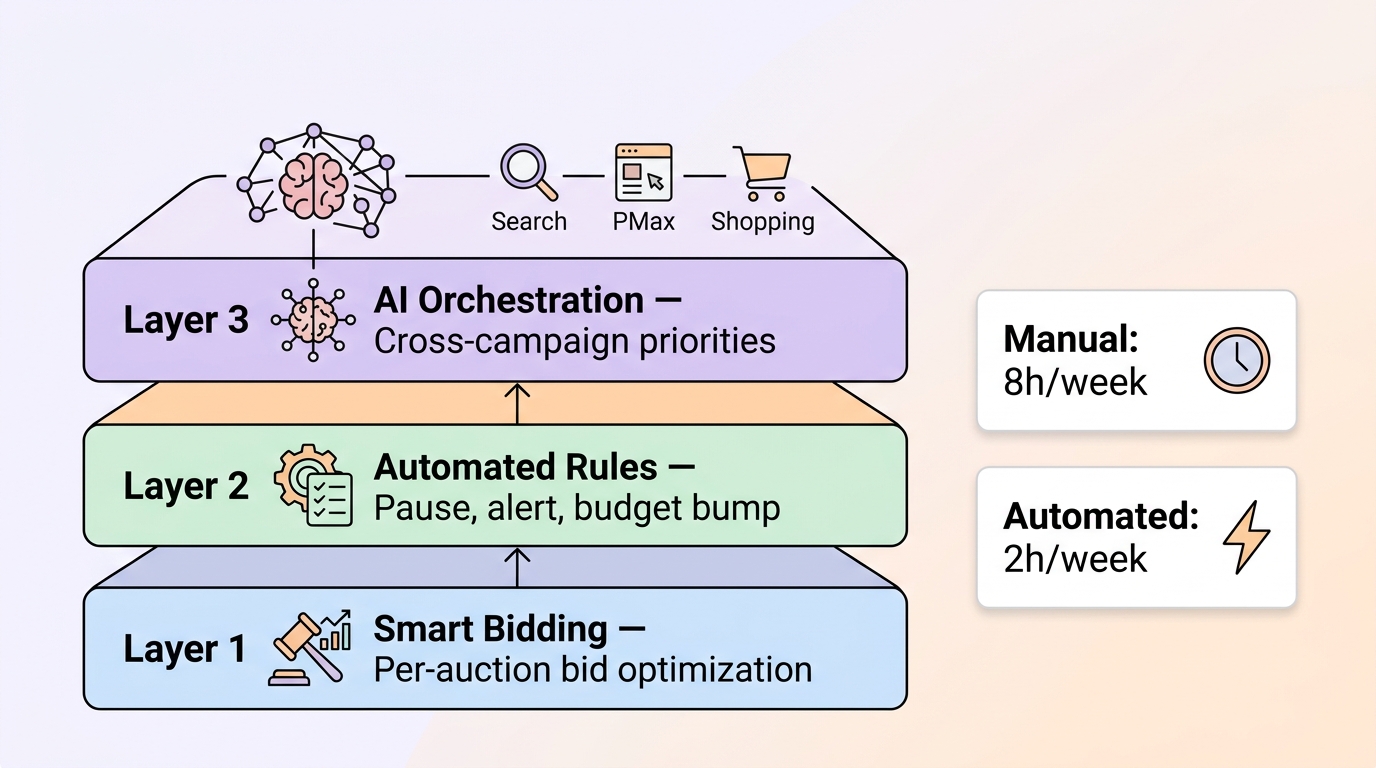
Google Ads automation operates across three distinct layers, each handling a different scope:
- Smart Bidding — Google's ML sets bids at the per-auction level based on real-time signals (device, location, time of day, search query, audience). This is the core automation layer for bid management.
- Automated Rules — If-then logic you define in the Google Ads UI (e.g., "pause keywords with spend > 3× CPA and zero conversions in 14 days"). Rules handle deterministic tasks that don't require ML.
- AI Orchestration — Third-party AI tools that work across campaigns, accounts, and channels to surface priorities, rebalance budgets, and flag anomalies that Google's native tools can't see in isolation.
Each layer handles a different scope. Most advertisers at scale need all three.
Still managing Google Ads manually across multiple campaigns?
Why Automate Google Ads?
Reduce CPA and improve efficiency
In our analysis of 400+ Google Ads accounts at AdsGo, automated accounts show 12–22% lower blended CPA compared to matched manual accounts at similar spend levels. The improvement comes from per-auction bid precision — smart bidding adjusts hundreds of variables simultaneously that no human can replicate manually.
The payoff isn't immediate. During the first 7–14 days of a new automation setup, CPA often fluctuates 15–25% while algorithms learn. The advantage materializes in weeks 3–8 and compounds over time.
Save time on manual optimization
Advertisers relying on manual checks spend an average of 8.4 hours per week on bid reviews, budget shifts, negative keyword sweeps, and reporting. Accounts with smart bidding plus automated rules cut that to 2.1 hours — with remaining time spent on creative testing and strategy rather than data entry.
| Task | Manual time/week | Automated time/week |
|---|---|---|
| Bid reviews | 3–4 hours | 0 (handled by Smart Bidding) |
| Budget pacing | 1–2 hours | 15 min (alerts only) |
| Reporting | 2–3 hours | 30 min (dashboards) |
| Negative keywords | 1 hour | 30 min (scripts flag candidates) |
| Total | ~8 hours | ~1.5 hours |
Scale campaigns faster
Manual management creates a linear relationship between scale and effort — more campaigns means more hours. Automation breaks that relationship. A well-configured automation stack can manage 50 campaigns with the same oversight effort required for 5. This is why automation is the foundation of every high-growth Google Ads account.
How Google Ads Automation Works (3 Core Layers)
Smart Bidding (AI bidding system)
Smart Bidding is Google's automated bid management system. It uses ML to set bids at the individual auction level, factoring in real-time signals that manual bidding can't process: device type, location, time, query intent, audience membership, and dozens of other contextual factors.
Available Smart Bidding strategies:
- Maximize Conversions — optimizes for the highest number of conversions within your budget
- Target CPA — optimizes to achieve a specific cost per conversion
- Target ROAS — optimizes to achieve a specific return on ad spend
- Maximize Conversion Value — optimizes for the highest total conversion value
Smart Bidding requires sufficient conversion data to function. Without data, it has nothing to learn from.
Automated Rules (if/then logic)
Automated Rules are condition-based triggers you define in Google Ads. When a condition is met, the system executes a predefined action automatically.
Practical rule examples:
- Pause keywords that spent 3× target CPA with zero conversions in 14 days
- Raise daily budget 15% on campaigns where CPA is 20% below target for 7 consecutive days
- Send email alert when impression share drops >15% week-over-week on a top campaign
- Label campaigns that exceed monthly spend thresholds for budget review
Rules excel at deterministic if-then work. They cannot interpret cross-campaign dynamics or make judgment calls — that requires the third layer.
AI Optimization Layer (cross-campaign intelligence)
Native Google automation optimizes within a campaign. It does not rebalance budgets across Search, Performance Max, and Shopping simultaneously, or identify when two campaigns compete for the same search intent.
AI orchestration tools fill this gap. They surface cross-account priorities — which campaigns to fund, which negative keywords to add at scale, where creative fatigue is suppressing performance — and connect Google with Meta in a unified view when you run both channels.
This layer matters most for accounts spending $10K+/month across multiple campaign types or managing Google and Meta simultaneously.
Step-by-Step: How to Automate Google Ads in 2026
Step 1 — Enable Smart Bidding
Match your bid strategy to your conversion volume. Enabling Target CPA before you have enough data wastes the learning period.
| Weekly conversions (per campaign) | Recommended strategy |
|---|---|
| Under 15 | Manual CPC or Maximize Clicks with caps |
| 15–30 | Maximize Conversions (no target) |
| 30–50 | Maximize Conversions with Target CPA |
| 50+ | Target CPA or Target ROAS |
How to set it up: In Google Ads → Campaigns → select campaign → Settings → Bidding → Change bid strategy. Set initial Target CPA at 15–20% above your true goal so the algorithm can explore. Tighten every 10–14 days once performance stabilizes — never daily.
Step 1 takeaway: Smart Bidding only works when you have enough conversion data. Set initial targets loose, then tighten as data accumulates.
Step 2 — Set Automated Rules
Build your rule stack before touching bids. Rules act as your safety net — they prevent runaway spend and catch performance issues that slip past daily checks.
Minimum rule stack:
- Pause keywords: spend > 3× target CPA + zero conversions in 14 days
- Budget raise: daily budget +15% if CPA is 20% below target for 7 days (set an account-level cap)
- Email alert: impression share drops >15% week-over-week on top campaigns
- Email alert: conversion volume drops >30% with stable click volume (tracking health check)
How to set it up: Google Ads → Tools → Automated Rules → + New Rule.
Step 2 takeaway: Rules handle repetitive tasks well — pausing, alerting, budget bumps. They cannot reason about cross-campaign tradeoffs. Build them before enabling Smart Bidding.
Step 3 — Automate Reporting and Alerts
Automation fails silently when nobody notices a tracking break or CPA spike. Before trusting any automated system, build a minimum viable alert stack:
- Daily CPA vs target by campaign — flag if 20%+ above target for 3 consecutive days
- Search terms report — surface high-spend, zero-conversion terms weekly
- Conversion tracking health — alert on 30%+ drop in recorded conversions with stable clicks
For teams beyond native rules: Google Ads Scripts can pull auction insights, Quality Score trends, and cross-account summaries into Google Sheets. Most mid-market teams combine one script (weekly negative keyword candidates) with one alert dashboard (CPA vs target) rather than building a full custom stack.
Step 3 takeaway: Set up alerts before automating bids. If a tracking break goes undetected for 2 weeks, automation accelerates the damage — not the results.
Step 4 — Add AI Optimization Layer
Once Smart Bidding and rules are in place, layer cross-campaign AI when your account complexity warrants it. Consider this layer when you:
- Spend $10K+/month across multiple campaign types (Search + PMax + Shopping)
- Run Google and Meta simultaneously and need unified budget visibility
- Lack bandwidth for weekly Search Terms reviews at scale
AdsGo AI Optimization operates at this layer — surfacing which campaign to fund, which negatives to add at scale, and where creative refresh will move CPA. For cross-channel visibility, Ads Manager consolidates Google and Meta spend, CPA, and creative performance in one workspace.
Step 4 takeaway: AI orchestration delivers the most value when managing multiple campaign types or channels. It finds cross-campaign priorities that Google's native tools miss entirely.
When Should You Automate Google Ads?
Based on conversion volume
Conversion volume is the most critical readiness signal. Smart Bidding requires data to learn from — without it, the algorithm explores randomly.
| Monthly conversions | Automation readiness |
|---|---|
| Under 15 | Not ready — use Manual CPC, build conversion history |
| 15–30 | Ready for Maximize Conversions (no CPA target) |
| 30–50 | Ready for Target CPA (set loose, tighten over time) |
| 50–100 | Ready for full Smart Bidding with portfolio strategies |
| 100+ | Ready for AI orchestration layer |
Based on campaign maturity
New campaigns need 4–8 weeks of learning before automation performs reliably. Launch with Manual CPC or Maximize Conversions, accumulate data, then transition to Target CPA or Target ROAS once you have a reliable CPA baseline.
Based on budget size
- Under $500/month: Rules-based automation + Manual CPC is sufficient. Smart Bidding's efficiency gains are marginal at this budget level.
- $500–$3,000/month: Maximize Conversions or Target CPA once volume supports it.
- $3,000–$10,000/month: Full Smart Bidding + automated rules + alert dashboard.
- $10,000+/month: All three layers including AI orchestration.
Manual vs Automated Google Ads (Comparison)
Time difference
Manual management scales linearly with account complexity. Every new campaign adds hours. Automation scales sublinearly — the marginal time cost of adding a campaign drops to near zero once your rules and Smart Bidding are configured.
CPA performance difference
| Timeframe | Manual CPA | Automated CPA | Difference |
|---|---|---|---|
| Week 1–2 | Baseline | +15–25% (learning) | Automation learning phase |
| Week 3–4 | Baseline | –5–10% | Early gains |
| Week 5–8 | Baseline | –12–22% | Full optimization |
| Month 3+ | Slow decay | Sustained improvement | Compounding advantage |
Control vs efficiency tradeoff
Automation gives up granular control in exchange for per-auction precision that human management cannot match. The tradeoff favors automation in most cases — but some decisions always require human judgment: campaign structure, creative strategy, offer positioning, and new market entry.
The best-performing accounts use a hybrid approach: Smart Bidding for bids, automated rules for safety nets, human decisions for structure and creative. Neither full manual nor full automation wins consistently — the combination does.
Common Google Ads Automation Mistakes
Automating too early
Enabling Target CPA before reaching 30+ monthly conversions forces the algorithm to learn with insufficient data. The result: erratic CPA, wasted learning budget, and a false impression that Smart Bidding "doesn't work." Fix: build conversion history with Maximize Conversions first.
Using bad conversion tracking
If your primary conversion fires twice per purchase (double-counting), or misses mobile transactions, Smart Bidding optimizes toward a false signal. You may see "good" CPA numbers in Google Ads while actual business results deteriorate. Fix: verify tracking fires once per action, reconcile Google Ads conversions against CRM data weekly.
Overlapping automation rules
Rules that conflict with Smart Bidding create algorithmic confusion. Example: a daily manual bid override on a campaign running Target CPA. The algorithm sets a bid, the rule overrides it, the algorithm adapts, the rule fires again — creating oscillation that keeps CPA unstable. Fix: use rules for pauses and budgets only; never use rules to manually override bids on Smart Bidding campaigns.
Changing targets during the learning phase
Editing Target CPA, changing bid strategies, or making large budget adjustments during the learning period resets the learning clock. Each reset costs 7–14 days of suboptimal performance. Fix: lock all settings for a minimum of one full learning window (50 conversions or 14 days) before making any changes.
Google Ads Automation Tools
Google Smart Bidding
Built directly into Google Ads, Smart Bidding is the foundation of every automation stack. It's free, always available, and handles per-auction bid optimization better than any manual approach at meaningful scale. No additional setup beyond enabling the bid strategy.
Google Ads Scripts
Google Ads Scripts use JavaScript to automate tasks beyond what native rules support. Common use cases: pulling search term reports into Google Sheets, generating Quality Score alerts, summarizing cross-account performance weekly. Scripts require basic programming knowledge but are extremely powerful for mid-market teams.
Best starter scripts:
- Search Terms Report to Sheets (flags high-spend, zero-conversion queries)
- Quality Score Monitor (alerts when QS drops below threshold)
- Budget Pacing Script (flags over/underspend mid-month)
Third-party AI tools (including AdsGo)
Native Google tools optimize within campaigns — they don't prioritize across campaigns, manage cross-channel budget allocation, or surface the full picture when you run Google and Meta simultaneously.
AdsGo AI Optimization works at the cross-campaign and cross-channel layer: surfacing which campaigns to fund, which negatives to add at scale, and where creative fatigue is suppressing performance — all in real time, without manual analysis.
Managing Search, PMax, and Shopping campaigns manually? AdsGo surfaces budget priorities, creative fatigue, and CPA anomalies across all campaign types — in real time. → Try AdsGo free
Automation Strategy by Campaign Type
Search Campaigns
Search automation works best when campaign structure is clean: tight ad groups, clear keyword themes, and maintained negative keyword lists. Automation amplifies structure — good structure scales, bad structure scales badly.
Automation setup for Search:
- Smart Bidding: Target CPA or Target ROAS once 30–50+ weekly conversions
- Rules: Pause high-spend / zero-conversion keywords weekly
- RSAs: Let Google test headline and description combinations — provide 8–10 strong assets per ad, not the minimum
Performance Max
PMax bundles Search, Display, YouTube, and Discover inventory. It is Google's most automated campaign type — and the least transparent. Automation here means trusting asset groups and audience signals.
What you still control in PMax:
- Asset quality (images, headlines, videos)
- Audience signals (seed lists for the algorithm)
- Budget allocation vs Search
- Brand exclusions
Treat PMax as a portfolio inside your automation policy, not a "set and forget" replacement for Search. Monitor the Insights tab weekly for brand cannibalization signals.
Shopping Campaigns
Shopping automation depends heavily on feed quality. Smart Bidding in Shopping chases whatever products your feed contains — if titles, GTINs, and custom labels are messy, the algorithm optimizes for the wrong products.
Automation setup for Shopping:
- Fix feed first: product titles, GTINs, pricing accuracy, custom labels by margin tier
- Use Target ROAS once you have 50+ weekly conversions
- Segment high-margin products into separate campaigns for bid priority control
- Consider Performance Max for Shopping only after Standard Shopping is profitably optimized
FAQ
What is Google Ads automation?
Google Ads automation is the use of Google's built-in algorithms (Smart Bidding), rule-based triggers (Automated Rules), and AI tools to manage bids, budgets, ad delivery, and reporting without manual intervention on every decision. It replaces repetitive human tasks with systems that react in real time to performance signals.
Is Google Ads automation worth it?
Yes — with the right prerequisites. Accounts with reliable conversion tracking and 30+ monthly conversions per campaign consistently see 12–22% lower CPA and 75% less management time after implementing Smart Bidding plus automated rules. Automation without good tracking or sufficient data does not improve performance — it scales whatever signal it receives, good or bad.
When should I use Smart Bidding?
Start Maximize Conversions (without a CPA target) at 15–30 monthly conversions per campaign. Add a Target CPA once you reach 30–50 conversions/month. Set the initial target 15–20% above your true goal and tighten every 10–14 days. Never enable Target CPA on a campaign with under 15 monthly conversions — the algorithm will spend your budget learning from noise.
Can automation reduce CPA?
Yes, but not immediately. During the 7–14 day learning phase after enabling Smart Bidding, CPA typically increases 15–25% as the algorithm explores. The reduction materializes in weeks 3–8, averaging 12–22% lower blended CPA in our analysis of 400+ accounts. Maintain the same settings throughout the learning phase — changes reset the clock.
Should I still manage Google Ads manually?
Some decisions always require human judgment: campaign structure, creative strategy, offer design, landing page testing, and new market entry. Automation handles the execution layer — per-auction bids, routine pauses, alert escalation. The best-performing accounts use a hybrid: Smart Bidding for bids, automated rules as safety nets, and human oversight for strategy. Full manual management at scale is inefficient; full automation without human oversight misses structural problems and creative decay.
Final Takeaway
Google Ads automation is not one tool — it's three layers working together:
- Smart Bidding for per-auction bid precision (better than any manual approach at scale)
- Automated Rules as a safety net for deterministic tasks (pausing waste, alerting on drift)
- AI Orchestration for cross-campaign priorities (budget allocation, cross-channel visibility)
The recommended hybrid strategy for 2026:
- Humans own: campaign structure, creative decisions, offer strategy, new market entry
- Automation owns: bid execution, routine pausing, reporting alerts, budget pacing
- AI tools own: cross-campaign prioritization, multi-channel optimization, anomaly detection
Start with reporting alerts, then add rules, then enable Smart Bidding once data supports it. Add AI orchestration when complexity demands it. Each layer builds on the last — skip a step and the foundation is unstable.
For diagnosing high CPA before you automate, see the companion guide: Google Ads AI Optimization: How to Reduce CPA and Scale Campaigns.